whoami?
I (@stanfrbd) am a security analyst with a focus on Threat Intelligence. I read a lot of articles, blogs, and docs to stay up-to-date with the latest threats and techniques. I am also the creator of Cyberbro, an open source tool for observables analysis (let’s say IP addresses, domains, file hashes…). I have been using Hister for a few weeks now, and I wanted to share my feedback and experience with the community.
How I discovered Hister
I discovered Hister thanks to a post by Korben, a well-known French tech blogger (check the article).
The UI looked great, the Go implementation was fast and efficient, and the documentation was clear.
I had it running in Docker on my homelab in under five minutes. Security is pretty good too, with native OAuth and access token support. Even if it’s still in development, it’s already robust (see the docs).
Daily Use and AI Workflows
I am an early adopter of generative AI tools, especially MCP (Model Context Protocol) servers. I think this is what makes AI “do things”.
Before Hister, I relied on MCPs and “fetch-page” functions, but anti-bot and Cloudflare protections often blocked me, as this is basically scraping.
I could probably use Playwright MCP but it consumes too many tokens and is not as efficient for quick lookups. With Hister, I can search my (full text) indexed content directly, which is much faster and more reliable.
Now, since Hister gathers pages as I browse, I can search that content locally. I care a lot about my indexing rules (especially skip rules).
I manually index some pages, sometimes disable auto-indexing, and exclude domains like YouTube, SharePoint, and cookie consent pages, using skip rules and the web extension toggle.
I use different LLM models with MCP in VSCode, which lets me generate hunting queries and fetch content from articles I actually read. That’s something really useful for my work.
Hister is becoming my personal knowledge base. No more irrelevant AI summaries from random sources. I can control what’s indexed, so relevance is not really a problem anymore (if I know exactly what I’m looking for).
For example, when the Bitwarden CLI npm compromise happened, I could instantly search my Hister instance for everything I’d read on the topic.
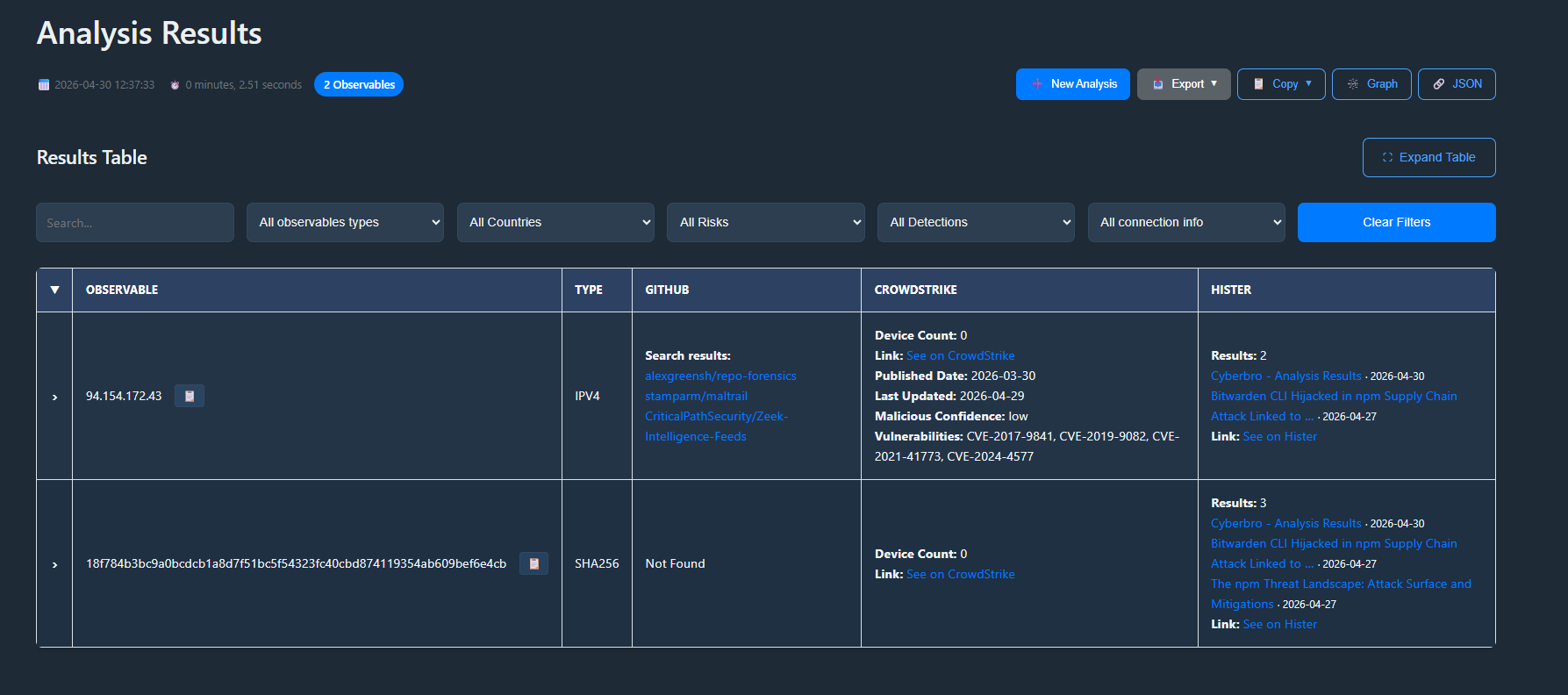
I also integrated Hister’s search API into my open source project, Cyberbro, to search for articles and IoCs at scale (example of curl query that has been translated in Python Cyberbro’s engine):
curl -G "https://hister.myinstance.net/search"
  --data-urlencode 'query={"text":"stealer.cy","limit":10}'
  -H "Authorization: Bearer <REDACTED>"
  -H "Origin: hister://"
This lets me search multiple articles directly from Cyberbro.
Here is an example of Cyberbro output with Hister integration:
Example Prompt
Here’s a prompt I used in VSCode (properly configured with my Hister MCP):
Gather articles from Hister about Bitwarden CLI compromise (npm) and summarize all the details in an actionable format (SOC/CERT/CTI purpose).
Generate a list of IoCs, TTPs, and mitigation strategies mentioned in those articles. Focus on technical details and practical recommendations.
Propose 3 hunting queries that don't rely on IoCs but on TTPs or other indicators of compromise. Format the output in markdown for easy reading.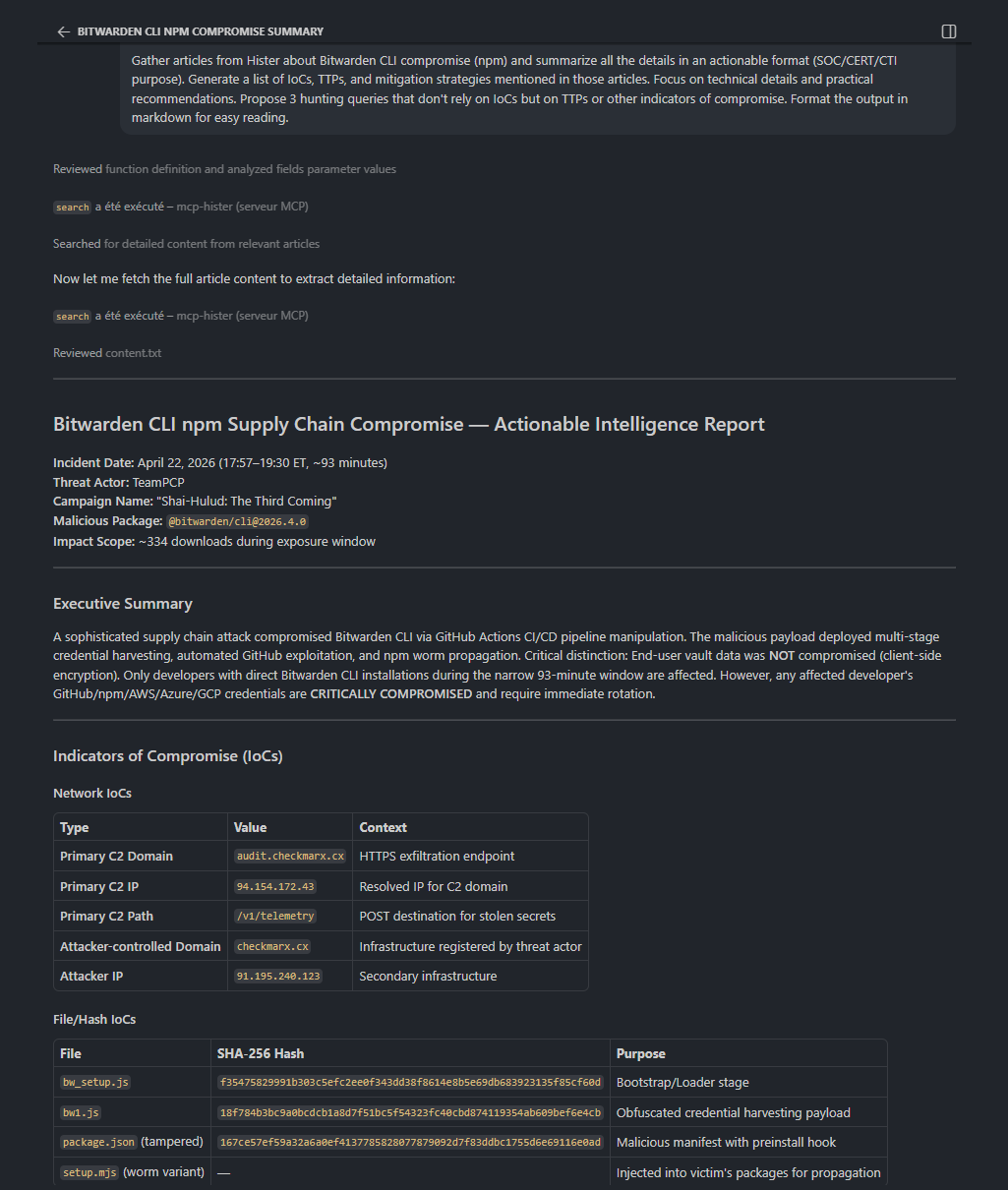
Tips & Tricks
- Be careful with your indexing rules. Don’t index everything with the web extension. There’s no community ruleset yet, but there’s a discussion here.
- Manual curation pays off. Exclude noisy domains and focus on quality sources, or disable auto-indexing.
- Hister is young, so expect it to evolve fast. It’s built by the creator of Searx.
Some Thoughts
Hister is probably one of the most exciting tools I tried in a while.
If you work in Cybersecurity or just read a lot of articles, or docs, give Hister a try. Set it as your default search engine. There’s nothing to lose, since it falls back to Google if needed. Use it, experiment, and help it grow :)
@asciimoo is really nice and open to feedback, so don’t hesitate to share your thoughts in the discussions or on GitHub.
Happy browsing!
Additional setup information
Setup with Docker
Rolling releases (from master branch), easy setup, and a focus on privacy made Hister a no-brainer.
I ingested my browser history right away, so I started with a solid baseline of articles and docs. Setting it as my default search engine was an easy task, and I like that it falls back to Google if Hister finds nothing locally.
Here is a very basic example of docker-compose setup:
services:
  hister:
    image: ghcr.io/asciimoo/hister:master
    container_name: hister
    restart: unless-stopped
    volumes:
      - ./data:/hister/data
    environment:
      - HISTER__SERVER__ADDRESS=0.0.0.0:4433
      - HISTER__SERVER__BASE_URL=${HISTER__SERVER__BASE_URL}
      - HISTER__APP__ACCESS_TOKEN=${HISTER__APP__ACCESS_TOKEN}
    ports:
      - 4433:4433
Regarding secrets management: I am a big fan of SOPS for managing secrets, so I store my access token in an encrypted file (.env.enc) and load it as an environment variable when starting the container.
sops exec-env .env.enc 'docker compose up -d'Importing browser history
I simply copied the places.sqlite file from my Firefox profile and imported it into Hister. You can do this with a simple command:
docker exec -it hister
# ./hister import browser firefox ./data/places.sqliteNote: I use Hister with a Cloudflare Tunnel (may change in the future), so I set the HISTER__SERVER__BASE_URL to my tunnel URL (e.g. https://hister.myinstance.net) and generated a random access token for security + access policies.
Be very careful with your access token, as it grants full access to your Hister instance. Don’t hardcode it in your code or share it publicly.